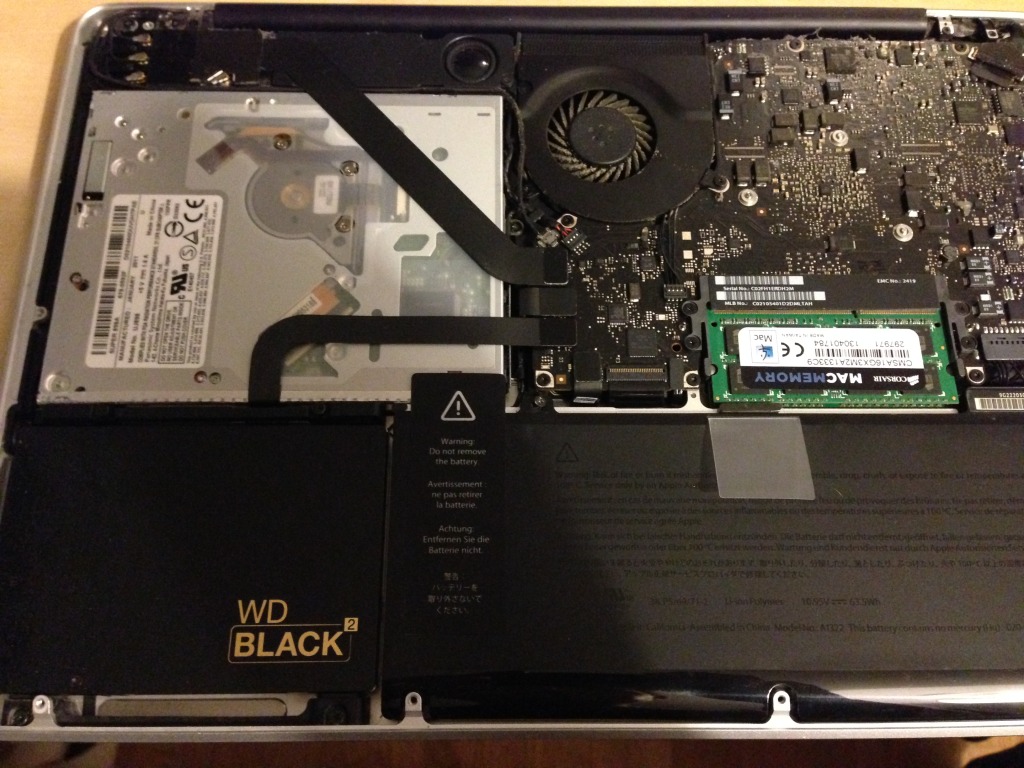
Western Digital Black² in a Apple Macbook Pro 13″

UPDATE:
The method described below worked before Western Digital official supported the drive on a Mac. They now have both the firmware update tool and software to run as either a dual drive of a fusion drive on a Mac:
http://support.wdc.com/KnowledgeBase/answer.aspx?ID=11750
http://support.wdc.com/downloads.aspx

The Western Digital Black² is a 120GB SSD with a 1TB 7200rpm regular hard drive in a single 2.5″x9.5mm case. I thought it would be ideal for both expanding and speeding up my MacBook Pro 13″ without needing to use a hard drive caddy and remove the DVD drive, which I still use from time to time.
I went ahead and got one without realising it wasn’t compatible with a Mac. Since the move to Intel almost everything is these days, so I just assumed it would be. Not wanting to give up, I did some Googling and found that AnandTech reports that once partitioned using Windows, it is readable on a Mac.

Annoyingly you have to install the Black² as an internal drive in computer, otherwise the automatic partitioning tool won’t recognise it. I din’t have a Windows PC I could put this in, so I had to install it in my Mac first, install windows just to use the partitioning tool, and then copy back over my Mac OS. This is all the steps I did to get it working:

1) Backup your existing drive, its important to do this often anyway, but especially since this is not supported, I or Western Digital will not be responsible for any damage or loss suffered to you, your hardware, or your files.

2) Remove your old hard drive and install the Black² in its place.

3) Install Windows (I used Windows XP, so I also had to remove a ram chip to leave it with only 4GB RAM).

4) If on Windows XP SP2, install Windows Installer 3.1, download it onto a USB drive first so you don’t have to install the bootcamp drivers to get the WiFi working.

5) Run the WD Black² partitioning tool.

6) Hold the Alt key while booting and boot onto your backup or original hard drive on USB.

7) The Black² should now have two visible partitions. Erase existing partitions so that you’re left with one big one.
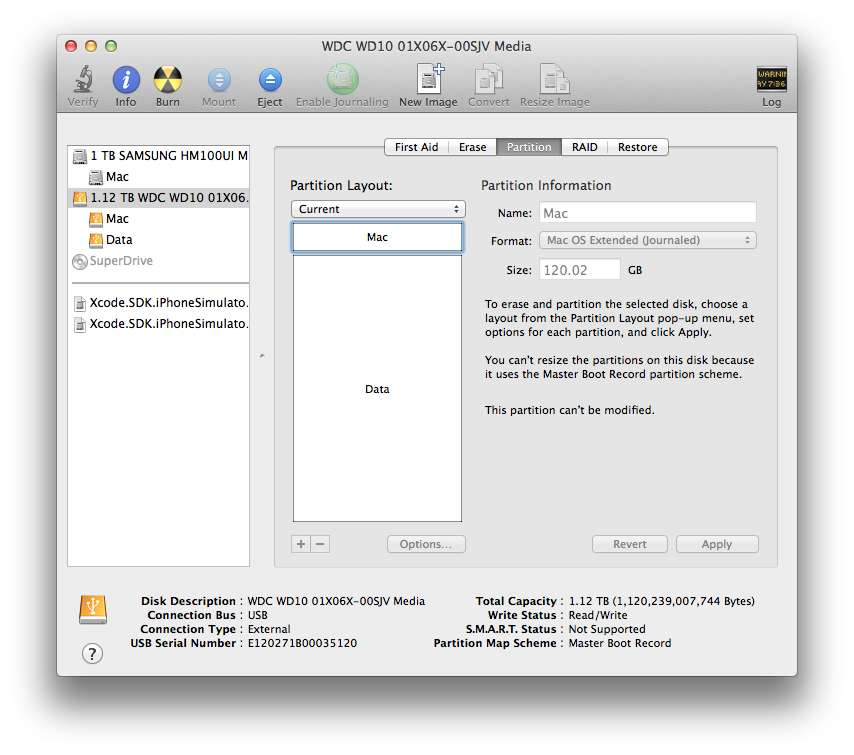
8) Create 2 partitions, the first one 119.8GB, and the rest for the remaining. I experimented with different sizes, but 119.8GB left the right block sizes (see appendix).

9) (Recommended) Add an additional partition of 1GB to the end of the first (SSD) partition you just created. I then cloned by old recovery partition using the instructions here. Update: I’ve changed this from optional to recommended, since when I tried to upgrade to OSX 10.10 Yosemite it couldn’t install because it wasn’t able to create the Recovery HD. I also tried to create it with Carbon Copy Cloner as a 650MB partition and that failed too. I don’t know if its because my partitions weren’t quite right and were overlapping the SSD/HD but when I created the Recovery HD as a 1GB partition it worked, and Yosemite installed.

10) Clone less than 120GB of your original or backup hard drive onto the SSD. If you have more data, you may need to clone your home folder on to the magnetic hard drive bit.

11) (Optional) If you have too much data for the 120GB, clone your home folder to the magnetic hard drive partition, and after booting up, move your home folder location.

12) (Recommended) Enable Trim. You can use Trim Enabler (paid) or what I used Chameleon SSD Optimizer (free). If anyone is interested, there seems to be an extra hardware controller in between the SATA and the drives to make sure trim command only effect the SSD not the magnetic partition.

Notes:
There has been one or two settings that have changed on my Mac. I’m not sure if this is a result of moving my user home folder, cloning the hard drive, or something else. It seems unlikely that it would be because of using the Black², but I’ll report back as I’ve spend more time using the system. The settings changed were:
– Custom screenshot location overridden
– Mac gatekeeper changed from “All” to “Trusted”

Also strangely Western Digital do have a firmware update tool for the Black2 that does work on a Mac. I haven’t tried it, and not sure if I will yet.

Updates:
– I just tried to update to Yosemeti and realised it won’t install if the partitioning scheme is master boot record instead of guid. I updated above to include these steps.
– In searching to fix the partitioning scheme problem I found that someone else has done this before, and also turned it into a full fusion drive!
– I also found this article helpful for how to check out the partition sizes in detail.
– Also since doing this upgrade I’ve noticed I get the the “Disk too slow (recording) -10004” error when using GarageBand. I’m not sure if its the hard drive, or making the upgrade to Yosemite on an older Mac, but now I have to record to an external hard drive (not the one that the OS is on. I used to be able to do this when I had a normal hard drive. The disk isn’t slow, my boot times are at leas 6-10 times faster, but it maybe “glitchy” in a way that GarageBand doesn’t like.

Appendix:
Partition Block Sizes using sudo gpt show /dev/disk0

After WD Black2 Tool on Windows + Converting to GPT. I really should have done this before converting to GPT for it to be more accurate. From this you can see that the last block of the 1st partition should of the 120GB SSD partition should be at most 234420417 + 63 = 234420480 to be sure its on the SSD. In addition the start of the 2nd block should be at least 234442752.

start size index contents
0 1 PMBR
1 1 Pri GPT header
2 32 Pri GPT table
34 29
63 234420417 1 GPT part - 48465300-0000-11AA-AA11-00306543ECAC
234420480 22272
234442752 1953523712 2 GPT part - 48465300-0000-11AA-AA11-00306543ECAC
2187966464 319
2187966783 32 Sec GPT table
2187966815 1 Sec GPT header

After deleting original partitions and formatting to two partitions using Disk Utility and the first set to 119.8GB. Apple creates the EFI partition at index 1, so now index 2 is the 120GB we will store the OS on. The last block of this partition 233984376 + 409640 = 234394016 which is < 234420480. Apple also intentionally creates a large gap after any user partitions. This makes the first block of the normal hd partition start at 234656160 which is > 234442752.

start size index contents
0 1 PMBR
1 1 Pri GPT header
2 32 Pri GPT table
34 6
40 409600 1 GPT part - C12A7328-F81F-11D2-BA4B-00A0C93EC93B
409640 233984376 2 GPT part - 48465300-0000-11AA-AA11-00306543ECAC
234394016 262144
234656160 1953048472 3 GPT part - 48465300-0000-11AA-AA11-00306543ECAC
2187704632 262151
2187966783 32 Sec GPT table
2187966815 1 Sec GPT header
After I used Carbon Copy Cloner to create the recovery partition on the SSD, this is what I get:

start size index contents
0 1 PMBR
1 1 Pri GPT header
2 32 Pri GPT table
34 6
40 409600 1 GPT part - C12A7328-F81F-11D2-BA4B-00A0C93EC93B
409640 231887224 2 GPT part - 53746F72-6167-11AA-AA11-00306543ECAC
232296864 262144
232559008 1835008 3 GPT part - 426F6F74-0000-11AA-AA11-00306543ECAC
234394016 262144
234656160 1953048472 4 GPT part - 48465300-0000-11AA-AA11-00306543ECAC
2187704632 262151
2187966783 32 Sec GPT table
2187966815 1 Sec GPT header
Presonus iTwo with Garageband on iPad

I really miss my M-Audio Fasttrack 8R. M-Audio/Midiman had the most stable drivers and best customer support, until they were bought by Avid, and the sold again, decimating one of the best value midi/audio interface companies.

I sold the Fasttrack to downsize, but also because the drivers were becoming less and less stable on newer versions of Mac OS, and it became impossible to contact Avid without paying for support. I bought a Apogee ONE, but the Mic did’t compare to my old Rode NT1, and I missed being able to do 2 mics, or 2 lines at the same time.

I’m about to sell my ONE and get a PreSonus Audiobox iTwo (it wasn’t out when I got my ONE). I was trying to figure out if it would work with Garageband on the iPad for mobile recording, since in all the marketing they push their own app. I contacted their sales and go this reply:

“You can use Garageband; you’re not limited to just our recording app, no.

Conversely, there are people who bought our PreSonus Capture iOS app and use the built-in mic or other 3rd party audio interface on their iPad to track stuff when they’re out an about… so our software app isn’t limited to just work with our iOnes/iTwos.”

I also eventually aw that right at the bottom of the features they have a comment that it works with other apps on the iPad:
http://www.presonus.com/products/AudioBox-i-Series/features

Update:
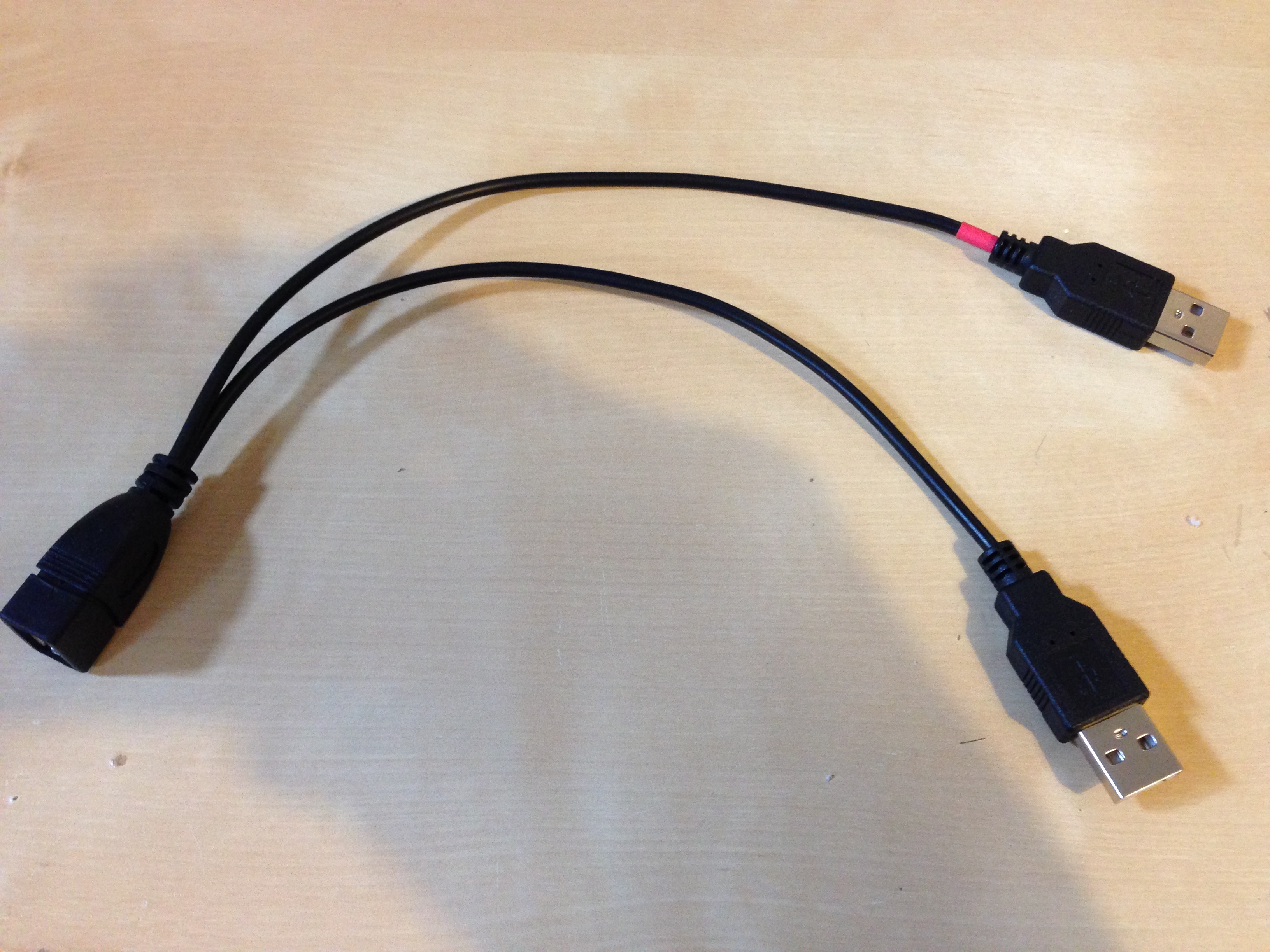
I sold an Apogee ONE for iPad because it would cause crashes on waking from sleep. I was going to get the iTwo interface, but decided on the Audiobox USB because it was cheaper. Unfortunately that interface doesn’t work with the iPad (unlike the Audiobox VSL 22). It gives the “device uses too much power” even when plugged in through a powered USB hub or one of these dual USB power cables and removing the power pin going to the iPad:

Dumble in a box pedals list

Always loved Larry Carlton and Robben Ford’s tone, and even tried to build my own Dumble clone at one point. It didn’t sound good, and I didn’t have the expertise or time to make it sound good. Anyway, 13 years later and I’ve moved on in the music I play, but I still get GAS for that tone. Recently there have been more and more pedals trying to get that sound, and some of them are starting to come close. Here’s a list of the ones I know of:

I’ve owned both a Fishbone (Zendrive) and an SOV-1. When I compared the two the Fishbone sounded closer to me, less saturated and more touch sensitive. It was also smaller and didn’t run off mains voltage, so I kept it. Having heard demos of the Simble I was tempted to get one of those, however recently I’ve just bought a Fulltone Fulldrive 3 to replace my Fulldrive 2. I found that with the comp-cut mode, I could get close to the Dumble sound too. I hope to put up a comparison soon, but first impressions are, the FD3 comp-cut sounds more open and transparent (something I wanted out of the Simble) and is even more touch sensitive than the Fishbone, but a little bit more saturated when playing harder. The fishbone has a more pronounced midrange, making it to my ears sound more like Robben Ford, and the FD3 comp-cut more like Larry Carlton.

Update: Here’s a demo of the Fulldrive 3 (Comp-cut mode):

Oh I almost forgot, there was also the infamous Freekish Blues Joyo Alpha Drive

Low cost made in China pedals

A list of some of the low cost pedals coming out of China these days. In some ways its a good thing, but Bill Finnegan of Klon Centaur fame, and some interesting things to say about when any company (not just Chinese), just clones a pedal, rather than offering their own unique interpretation. Anyway, on to the list:

In addition to the effects pedals, Joyo make tube amps, as do Bel Cat sometimes branded as SubZero. An “honourable mention” also goes to Behringer, while a German company, are made in China and compete in terms of value.

Small single-pedal sized multi effects

I’ve been searching for a single-pedal sized multi effects pedal to fill the last spot on my pedal board. Personally I want something that could do octave up/octave down (like an EHX Pog, but in a smaller/cheaper pedal) and the be a delay or chorus if I need it. After Googling, I didn’t find much of a definitive comparison list, so here’s a list of what I found. Let me know if you know of any others.

Update 1: I realised the iStomp Shape Shifter plugin doesn’t do chord/polyphonic tracking very well, so that’s now out. There is the Z-Cat Poly-Octaver 2, which also has Reverb and Chorus, so that’s almost multi fx – 3 pedals in one. There’s also the Mooer Pure Octave (and other mooer pedals) which are so small, you can get more than one for the same space on the board for different effects.

Update 2:
Polyphonic Dual Octave Harmonizer List:
EHX Nano Pog
EHX Pitch Fork (More features than the POG)
Z-Cat Poly-Octaver 2 (has a 20ms delay)
Earthquake Devices Organizer (turn the octaves down to have less woble)
Earthquake Devices Pitch Bay (has a little distortion even with gain turned down)
BOSS PS-6 Harmonizer (tracking issues with Chords)
Mooer Pure Octave (doesn’t sound like it tracks well)
TC Electronic Sub-n-up (and sub n up mini)

Update 3:
Neunaber technology just announced their Stereo v2 pedals, which while only doing a single effect at a time, can have up to 4 effects switchable with 2 presets each. I recently bought a Slate v2, and if you’re looking for something more high end than everything else on this list check them out at neunaber.net.

Update 4:
A few other multi effects pedals:
Nux Mod Core (Modulation only)
Hotone Xstomp (and Xstomp mini)

Digitech iStomp
The iStomp itself is one of the cheapest around, and Digitech recently made most of the iStomp pedals free. I’ve owned one of these before, and it does have an octave up/down effect. Main disadvantage is that it requires an iPhone to change effect, and its also a little wider than a standard pedal.
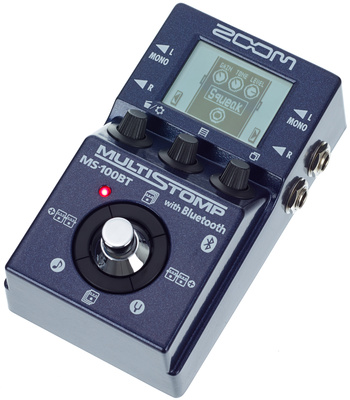
Zoom Multistopm MS-100BT / MS-50G
Unlike the iStomp, this pedal has more editing features onboard and can do more than one effect at a time. Like the iStomp the MS-100BT can be updated with new effects via an iPhone (MS-50G is standalone), but there is no octave up/down sound yet.

Update:
I’ve just seen that this has a pitch shifter, so you could at least get octave up or down, but because you can run more than one effect, you might be able to add it twice and get both up and down.
It also has a Z-Organ patch which seems to a polyphonic up/down effect

Update 2:
I bought one of these, none of the pitch effects including the Z-Organ track well at all, and while its a fun pedal to own, its not good enough for nice ambient swells.

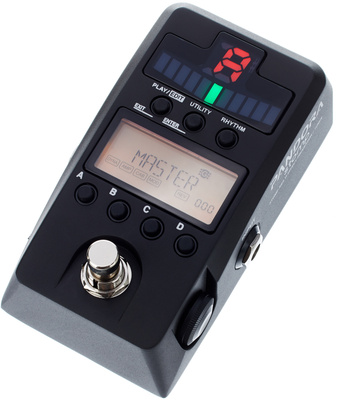
Korg Pandora Stomp
This pedal does tons for the price, but seems a little complicated for live use. It does have pitch shifting effects, but I’m not sure if it can do the octave up/down thing.
Behringer Digital Multi-Fx FX600
Behringer make great value stuff, and this pedal seems to have a really straight forward interface. I’ve heard bad things about the sound quality on this one though.
Beta-Alvin Multi Effects ME-100
One of the new low cost pedals to come out of China, but I’d never heard of this brand before. Seems to have a nice simple interface, but a limited array of effects.

Pedal and amp list

Current Pedals
Custom 4 in 1 Overdrive/Compressor
TC Electronic Sub n Up
Besbeco Weeper Wah (converted into switchable volume/expression pedal)
Empress Reverb
DMC.Micro MIDI switch
BOSS RC-3 (rehoused with second footswitch)
Fishman Aura Spectrum DI (Acoustic Pedal)
Cioks DC-5
Empress MIDI Box 2

Amps
Mesa/Boogie DC-5
Fender Tweed Pro Jr.
Trace Elliot TA-50 (acoustic amp)
Fender ’65 Deluxe Reverb Reissue
Fender Super Champ XD
Fender Blues Jr. with Billm mods
Two-Rock Jet 22 Head (sold very quickly)
Victory V40 Viscount Combo (current amp)

DIY Pedals
Custom 4 in 1 Overdrive/Compressor (Flip-Flop switching overdrive)
Custom 3 in 1 Overdrive/Compressor (Similar to Keeley Tone Workstation)
Custom 2 in 1 Overdrive/Compressor (Similar to Wampler Dual Fusion)
Custom Smaller Two-Rock Footswitch
Custom Neunaber ExP (x2)
Blues Jr. Footswitch (x2)
Mini Expression Pedal
Empress Tap/Hold footswitch

Previous Pedals
Digitech RP1
Alesis Volume Pedal
Alesis Nanoverb
Crybaby 535Q
Ayan Smooth n Slim (Twice)
Line6 POD (Twice!!!)
Marshall Blues Breaker
Crybaby Wah
Homemade Fuzzface Clone
Digitech RP100
Ernieball Stereo Volume Pedal/Pan
Little Lanilei Spring Reverb
Analog Man Stereo Chorus
Fishman Aura 16 (Acoustic Pedal)
Digitech iStomp
Fulltone Fulldrive 2
Maxon AD-80 Reissue
Fishbone Overdrive Special (Zendrive Clone)
TC Electronic Flashback Delay
Fulltone Fulldrive 3
Neunaber Slate v2 (Wet Reverb)
TC Electronic Alter Ego v2
Electro Harmonix Pitch Fork
TC Electronic Stereo Ditto Looper

Pedals owned for a short time just to try
Zoom MS-100BT
Behringer GDI-21
JOYO 6 Band Eq
JOYO Sweet Baby
Electro Harmonix Soul Food
JOYO JDI-01
Diago Little Smasher
EHX Caliber 22
Chase Bliss Gravitas
Line 6 Pocket POD
Korg Pandora Stomp
Nux Mod Core
TC Electronic Dark Matter (2 because one had a fault and was replace in warranty)
Carl Martin Headroom Real Spring Reverb
Line 6 HX Stomp

Fulltone Fulldrive 2 Circuits

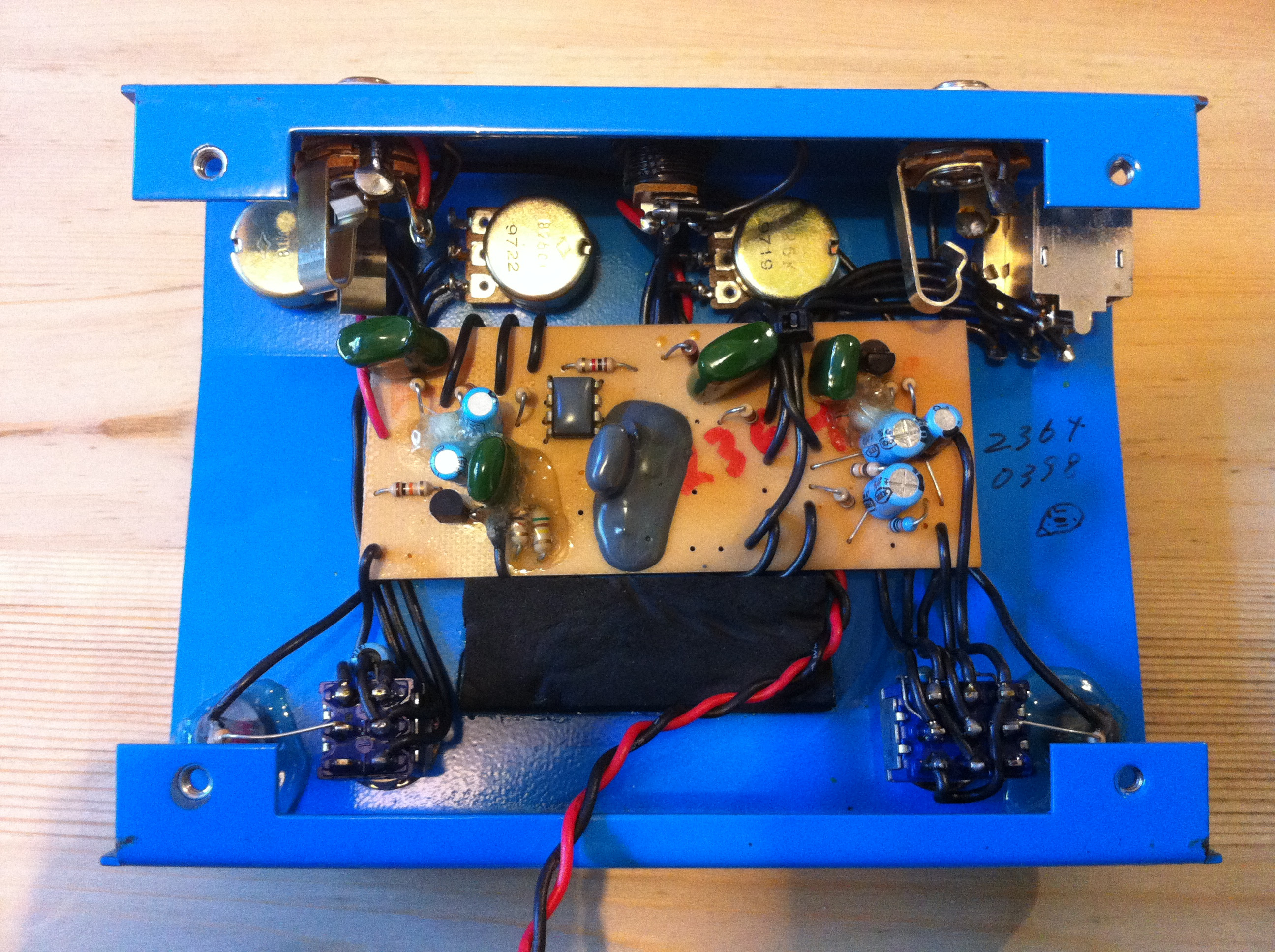
I was looking into moving my Fulldrive 2 circuit into a smaller pedal enclosure (Hammond 1590BB) so that it took up less space on my pedal board. While I was looking into it, I realised that my Fulldrive 2 was one of the few pedals that could easily be moved into a smaller enclosure.

There seem to be 3 main variations:

fulldriveshortboard fulldrivelongboard fulldrivelongboard
Short circuit board – hand wired (early original edition) Long circuit board – hand wired (late original edition) Printed circuit board (MOSFET edition)

The really early Fulldrive 2s seem to have shipped in Hammond 1590BB enclosures:

fulldrive1590bb

Ikea Standing Desks

While I was at Onoko I did a standing desk for a while. While it was really good, I found doing it 100% gave be cramps in my legs. Now that I work at home a smaller desk (in additional to sit down desk) that would take up less room and also allow me to move it around the house or even to the garden to work! I had some GERTON legs so I got a £1 piece of wood from the bargain bin and built my own. There are lots of fancy options at Ikea Hackers, but here are the other ideas I looked at:

At a height of 105cm the BILSTA Bar table would make a perfect standing desk. Its also available as just the base so you can add your own top from a piece of wood the bargain bin or any of: TROFAST / INREDA / ALGOT / KOMPLEMENT / BILLY / BILLY / FJÄLKINGE / IVAR / EKBY LAIVA or even the top off a LACK coffee table
Another bar table that works is BJÖRKUDDEN. Its quite deep so do can fit too people with laptops facing each other.
Get the GERTON legs extendable up to 107cm:
http://www.ikea.com/gb/en/catalog/products/60261626/

Get any of the compatible desks, or a piece of wood from the bargain bin or one of the tops mentioned above.

There are also the BILLSTA desk legs, but they’re more expensive and less flexible in terms of tops.

Use one of the wall mounted leaf desks:

Select an item from the various wall shelves available. If you want something bigger, buy the sturdiest brackets and again get a piece of wood from the bargain bin or one of the tops mentioned above.

I hope that’s helpful. Sorry the links are to the UK store if you live somewhere else. I’m still wondering if I should eventually get a Cycle Desk!

Simultaneous MIDI/Audio with Apogee ONE for iPad

The original Apogee ONE for Mac was USB audio compliant and could be made to work with the iPad with the iPad camera connector and a powered USB hub (see video).

I just tried the the same thing with the new Apogee ONE for iPad. It is USB audio compliant and does work natively with its own cable to the iPad, but I couldn’t get it to work with the USB cable through a powered hub in the same way as the original ONE.

Has anybody else managed to get it to work?

Disable Git in Eclipse

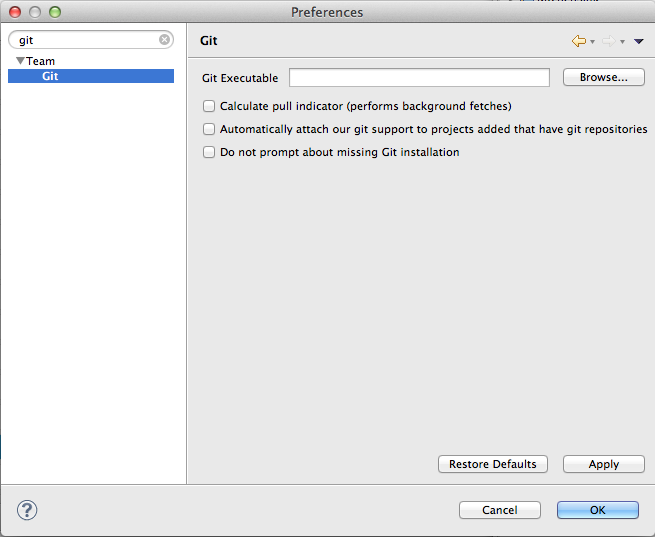
I use the excellent Source Tree as a visual Git client, and really dislike messages about versioning when I’m coding. Eclipse’s Git colours and overall intrusiveness seem to be particularly bad. I couldn’t find which plugin to remove but I did find the following settings:

This setting will stop Eclipse from automatically attaching its Git functions:

disablegit

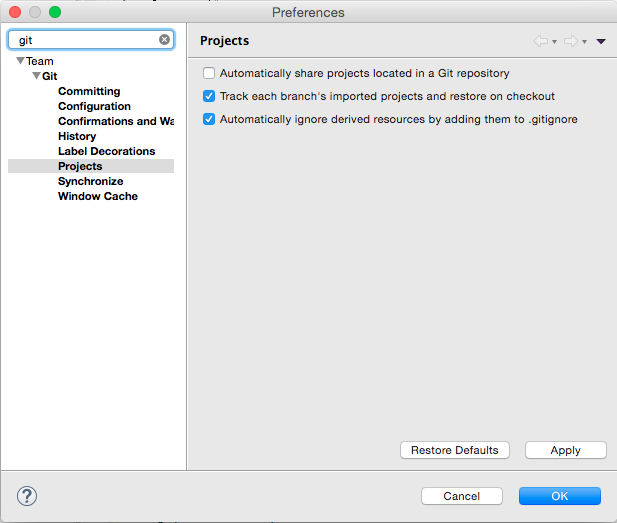
Update: Newer versions of Eclipse seem to use this setting:

disablegiteclipse

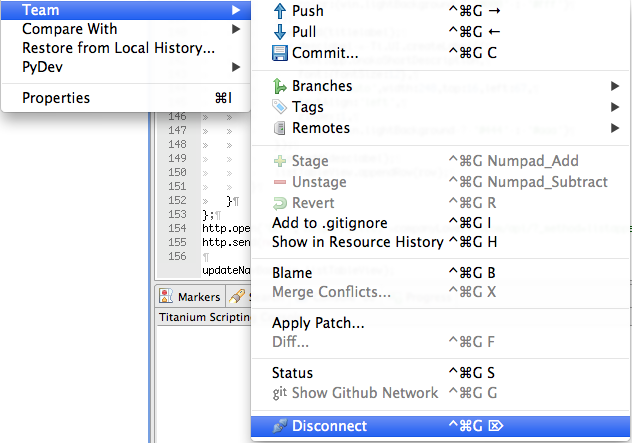
If you’ve already loaded some projects before disabling the above setting, you can disconnect those individual projects from Eclipse’s Git functionality here:

disconnectproject